I used to love Firefox. It was a lightweight, user-friendly and customizable browser. Sometime in March 2010, Mozilla, the parent organization in charge of Firefox, started with the "rapid release schedule", which meant half-baked features would be delivered every couple weeks.
From version 4.0, Firefox became a writhing mess of code that sort-of worked most of the time. Between updates is when I had to spend days on end to figure out how to work around the latest set of half-baked features and make it workable, at least to an extent. In March 2020, Firefox is at version 74. Does it warrant so many versions? Let's look into its source code and find out.
There's a truckload of prep work before we can get to see Firefox source code proper. First, I needed to install Visual Studio Community edition 2019. Since I already had the 2017 version, I had to uninstall it, which couldn't happen until I updated it (????). Stupid code monkeys. I gave them a tongue lashing in the uninstall survey. The official Firefox instructions for installing the source code viewer mentioned ~40 GB of free space required.
I clicked the option "Install while downloading", which made my PC stutter. It's not a video processing beast but works good enough. I hope this won't happen when opening the source code proper. I suggest you use the other option "download, then install". Then, I installed the "Mozilla Build Package", for which the guide said I shouldn't change the install location.
Well, I'm stuck already. I installed the bundle but can't download the source code. It throws up an "existing connection was forcibly closed by the remote host" error and the target folder on my PC remains empty. Let's try this again... After a little bit, the second attempt failed when downloading "file changes" at the 4050th one. I believe Mozilla's repository is busted in some way, but the fact they haven't fixed it tells me barely anyone checks the source code anyway. Now I'm actually intrigued. The instructions mentioned some "Mercurial" thing and I do recall downloading 1 GB+ of Firefox code in a zipped archive a couple years back.
It's a mess. The instructions even warn that they might be (meaning are) outdated, so I'm basically on my own doing this. Not very open source of Mozilla, at least with regards to viewing the source code. True, I can apparently view the source code through the browser but that doesn't really fix the trustability issue, does it? All right, I got it.
Archive Pub section of the Mozilla website contains all their projects, including Firefox. I chose version 72.0. Downloaded and extracted using 7-Zip. Extracted to the baked-in "mozilla source" folder using Winrar. Hopefully this works. After extracting 302,000 files, Winrar reports a couple errors, so I have to do it again with admin privileges. Extracted to its own folder, opened with Visual Studio and it finally worked!
Straight away, I can see a bunch of code and I can tell: this is not meant to be examined or tinkered with. There's so much code in here that it makes it nearly impossible to check even a fraction of it on my own. In theory, this is open source but in practice, this is closed source. In the meantime, Visual Studio started taking over my PC with a slew of updates, indexing tasks and so on. It's a pretty good environment, I won't lie.
Mozilla Firefox source code is strewn across 285,209 files. Yep, 285 THOUSAND. How can anyone think this is open source is beyond me. It's absolutely impossible to verify Mozilla's intentions when it comes to Firefox; we have to trust its word. I checked random files but any kind of dedicated analysis of the code would require hundreds of analysts working in tandem. By the time I figure out what's going on, Firefox will have already released version 300. Indeed, by April 11, 2020, Firefox was at version 75.
References to "NSIS" in Mozilla source code mean "Nullsoft Scriptable Install System", a way to install software on Windows. Nullsoft is the creator of Winamp, free music and media player. It provided NSIS under a combination of free licenses, the main of which is zlib.
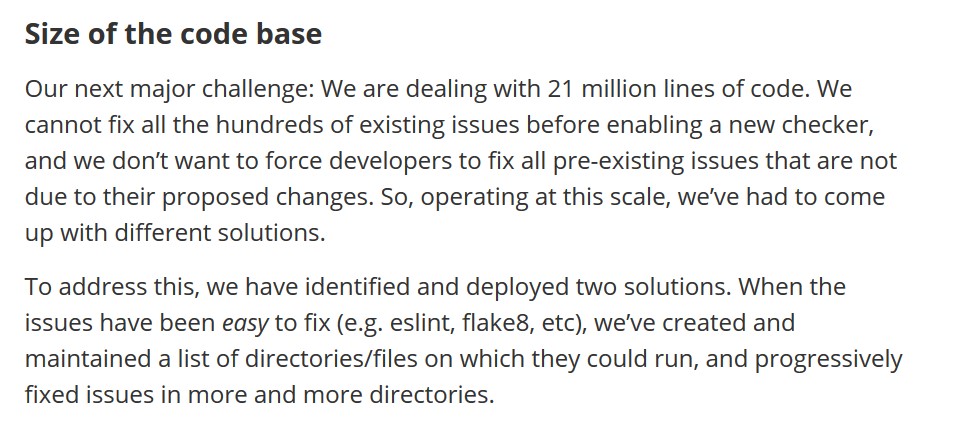
On April 22, 2020, two engineers working on Firefox, Bastien Abadie and Sylvestre Ledru, posted an article titled "Engineering code quality in the Firefox browser: A look at our tools and challenges" on Mozilla Hacks, stating that (click the image for a 110 KB, 966x429px version):
We are dealing with 21 million lines of code
Further down the article, we read about the way Mozilla analyzes Firefox patches, and we find Mozilla partnered with Ubisoft to create a machine-learning-powered patch analyzer. That's the problem: if the project is that big, you can't do it by hand, so you have to involve the big corporations, who might want something in return. At that point, any project is liable to being tainted or hijacked. It started out as an open source project but it couldn't scale.
Firefox has this bad habit of doing things against the user's wishes. For example, I have a Cinnamon Mint 19.1 installation with Firefox 66. When I started it again after some time, Firefox automatically updated itself to the latest version (75) and could no longer play Youtube videos while Palemoon 28 worked flawlessly. No way in hell am I going through the Firefox troubleshooting hell, I've been there so many times. I don't get it, who would break compatibility to push out a new version of software, just for what? Bragging rights? Seeing the version number grow?
So, I went to ftp.mozilla.org and downloaded an older version, in this case Firefox 72, which came packaged in a tar.bz2 archive. I downloaded and extracted the folder to Desktop. It is the portable version, meaning I don't have to install it. I ran it and it immediately updated itself without any prompts or any indication, it just did, again to version 75.
I make the prefs.js file with the update preference set to false but to no avail. At this point, Firefox behavior is identical to that of malware: it has a will of its own that it imposes on me, my hardware and my software without any warning, notification or choice. Firefox literally irrevocably changes the contents of a folder on my machine without my permission or a way to stop it. So, I set out to see how to break the updater.
I tested out deleting different files and found three of them:
Deleting these three would make Firefox show a mangled crash report and start normally. Clicking the "About" window showed a spinner in an infinite loop. When this installation of Firefox got closed, I wasn't able to start it back up again. I found Firefox had created an "Updates" folder. I deleted it and it started up again, showing another "crash report" and again working the spinner, with the "Updates" folder regenerating.
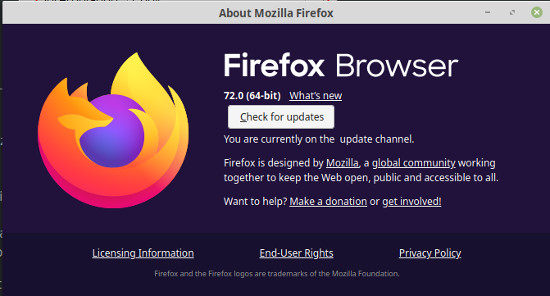
Then, I closed Firefox, deleted the "Updates" folder, created an empty file just named "updates" in the Firefox portable installation folder and Firefox started up normally! The "About" window simply showed a button "Check for updates". YES (click the image for a 44.57 KB, 550x296px version)!