Without a website, it's like you don't even exist. You have to rely on all sorts of platforms that have their own rules and restrictions. Want to make money? We're getting a cut. Want to say a naughty word? Banned for life. It's time to go out and make something of your own.
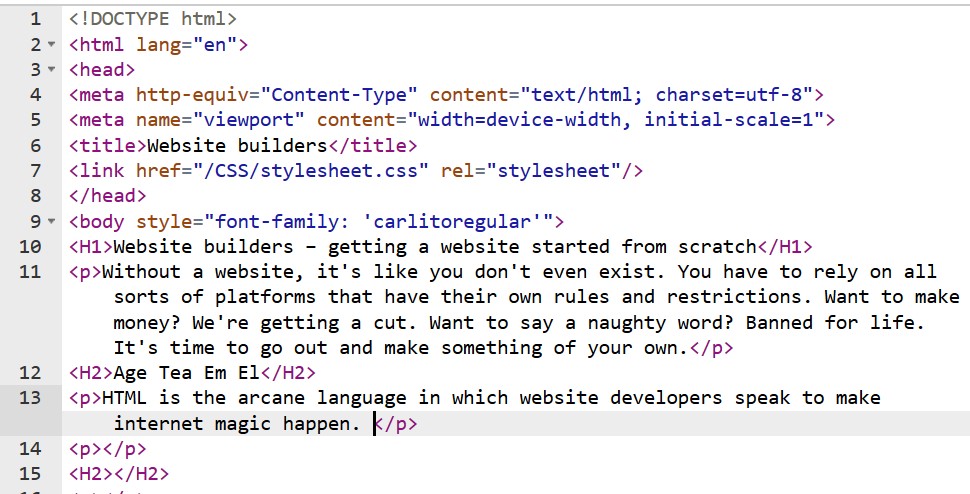
HTML is the arcane language in which website developers speak to make internet magic happen. It's been around for something like 40 years and it will probably stick around for another 40. In other words, it's a skill worth investing in. It looks like this:
Click the "View Source" option in your browser when on this page, which is most commonly done through the CTRL+U shortcut, and check out the source code. Writing HTML is a full-time job, as it takes so much effort to format everything properly but the good side is that it can be done in Notepad, though I suggest Notepad++ or some other advanced text editor. In any case, the reason why web developers shun HTML is that it takes too much work; modern website building comes down to copying ready-made code bundles and installing them with fingers crossed until something starts working.
In this instance, I struggled with finding the right resolution for that image. Normally, my webpages on wwpe.ba viewed on mobile show the headline neatly on top but that wasn't the case with an image involved. Setting the image size at "width:50%;height:50%" fixed the problem, looking great on mobile and PC. As you learn HTML, you too will figure out these neat tricks that can apply in all sorts of situations.
The main problem with modern webpages is that they rely too much on <div>, leading to this hackenyed rectangular look intrinsic to Facebook. It's as if someone layered collage paper and cut out tidbits here and there to let different layers show through. It looks sterile, boring and must be a nightmare to change, which is why nobody dares do so. When other webpages started copying it, we got a uniform look that doesn't show just how much we can do with HTML.
I made this website by simply taking the placeholder webpage that was parked on the home page and cutting out all the dead weight, such as social media links and rolling video backgrounds. With that out of the way, I could focus on making what I really want: a blazing fast website with no tracking or ads. You too should prioritize some function over another and just make your website the best it can be in that one aspect.
Everything in HTML works through tags, such as <div>. Tags always come in pairs, so for each <div> there should be a matching </div>. Some characters have to be "escaped", meaning they are reserved for writing HTML itself, such as less-than or greater-than signs. Attempting to just write these down can make a mess out of your website, so always escape them by writing down a special code for each special character. All of these you can find in the W3School.org database.
You've probably used forums with this kind of formatting; if you have, then you're already ahead. HTML is the most basic kind of website building that allows you direct control over your content. You are truly in charge though things can get broken if you leave out a colon or just an ending tag.
How do I have all this HTML knowledge? Easy, I copied what others have done, experimented with it and just implemented it here. You can visit any website and open source code (CTRL+U in Firefox or use Developer Tools) to examine its code. It does take a while and can be overwhelming, which is why I recommend W3Schools.com, a completely free, comprehensive guide on using HTML, including a color picking tool.
Making a good website can come about through reading and experimenting until your eyes bleed or you can just use a ready-made template, which is what most businesses are doing.
For the lazy ones among us, entrepreneurs have made fancy website builders, tools that hide HTML code beneath slick buttons and dropdown menus. Click, drag, drop and there's an image gallery. These website builders teeter between being usable and just window dressing. Some of them are a joke but there are others that are really useful and let you experiment on your own.
In my opinion, Weebly.com offers a great and completely free website builder tool. WordPress is good as well, though it mostly focuses on blog posts enhanced by installing plugins for added functionality. Jimdo is awful and pretty much doesn't let you do anything without coughing up money. Try them all and find the one that suits you.
Once you've made your page, run a validation check that will tell you if there are any errors. I use the W3 Validator service, which showed zero errors, except on pages where I left in empty <H2> headings or linked to images where filenames had empty spaces. Try validating any mainstream website page and you will see the warnings and errors running in the hundreds, with one CNN page titled "First US case of Wuhan coronavirus confirmed by CDC" and talking about the January 2020 Wuhan Coronavirus outbreak having 925 (click the image for a 105.88KB, 800x450px version).
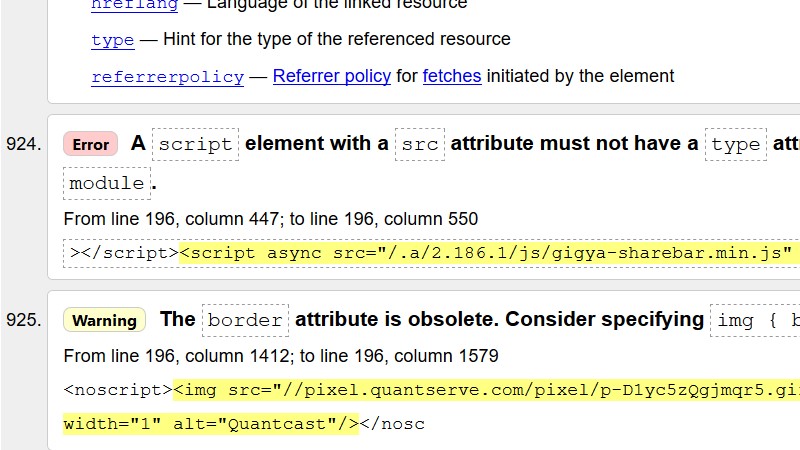
It's a hot mess but most of these mainstream websites are. They pack so much code, trackers and God-knows-what in their websites that there's no accountability or transparency if and when something goes wrong. I actually tried taking a full screenshot of all the warnings and errors on that CNN page but the addon kept crashing because the resulting picture was too large to save.
There are free offers all around, and they might not seem like much but you just need to get started with producing stuff until you find your groove and can churn out regular content. Find free stuff, take it and start building your own website. Make regular online/offline backups, tweak your content and have fun.